Tuesday, February 17, 2015
Best Deals for Samsung Galaxy S4
A slogan from Samsung said that this device will bring his buyers closer to what matters most in life, putting great emphasis on networking between people, interactions between family members and between friends, it already managed to impress all of us through his complexity of applications and embedded technologies, and through his design and usability, making life easier and more beautiful for his customers.
 With his thickness of about 8 mm or, with its high performance processor, AMOLED display technology, named active matrix organic light emitting diode, which can therefore enable and disable each pixel of the screen, with smart scroll, smart pause, and so on, these are just some of the features that Galaxy S4 has and that will recommend it for becoming the top leader in sales. So far the interest from potential buyers is extremely high, and this is a very good sign.
In a recent article on this blog you have, for example, 10 of the Galaxy S4 specials specs, which give it its uniqueness among all other competing smartphones.

Monday, February 16, 2015
Samsung Galaxy Note 10 1 Manual User Guide
 |
| Google Images |
Table of Content for the Samsung Galaxy Note 10.1 Manual / User Guide:
- Section 1: Getting Started
- Section 2: Understanding Your Device
- Section 3: Entering Text
- Section 4: Contacts and Accounts
- Section 5: Messaging
- Section 6: Web and Social Networking
- Section 7: Music
- Section 8: Photos and Video
- Section 9: Connections
- Section 10: Applications and Widgets
- Section 11: Settings
- Section 12: Health and Safety Information
- Section 13: Warranty Information
- Index
Get and Download the Samsung Galaxy Note 10.1 manual user guide here
Nokia Lumia 920 vs Samsung Galaxy Note 2 Christmas gift choice in 2012

Galaxy Note 2: 151.1x80.5x9.4mm, 180g
Those with small hands will likely find it a little more difficult to hold in one hand than the average smartphone. But don�t be afraid, Galaxy Note 2 has an improved S-Pen support, which is revamped with rubber tip and enhanced touch response.
Lumia 920: 130.3x70.8x10.7mm, 185g, available in a wide range of vivid color options.
Winner: Draw
Display
Galaxy Note 2 features a massive 5.5 inch Super AMOLED capacitive touchscreen display with 1280 x 720 pixel resolution and a pixel density of 267ppi., while On the other hand, Lumia 920 sports a 4.5 inch PureMotion HD+ IPS LCD capacitive touchscreen display with 1280 x 768 pixel resolution and a pixel density of 332ppi., better than the Galaxy Note 2.
Nokia�s ClearBlack tech boosts dark colours and contrasts on the phone while reducing glare in bright sunlight. Thanks to a fast refresh rate, Nokia�s PureMotion HD + delivers �better than HD� picture quality.
Winner: Lumia 920
See also: Compared to Apple iPhone 5 display, Nokia Lumia 920 is better
Storage
Galaxy Note 2 is in variants of 16, 32 and 64 GB of storage space. All three versions of the phone come with a slot for a microSD card that supports external memory expansion.
The Lumia 920 ships with 32 GB of internal memory on board. However, it does not support microSD cards for memory expansion.
Winner: Galaxy Note 2

Galaxy Note 2 is equipped with a Samsung Exynos 4412 Quad chipset supported by 2GB of RAM. And Lumia 920 is equipped with dual core 1.5GHz Qualcomm Snapdragon S4 processor, supported by 1GB RAM.
Winner: Galaxy Note 2

Operating System
Samsung galaxy Note 2 runs on Android 4.1 Jelly Bean, from calling to gaming to entertainment, multi-taking on the S Pen enabled device is a breeze. Nokia Lumia 920, runs on Windows phone 8, is not quite as advanced as Jelly Bean, but owns some pretty impressive specs including revamped tiles and social networking functionality. Though now Number of Windows Phone 8 apps is still lacking, but only time will tell how well Windows Phone 8 does in the market.
Winner: Draw
Camera
Galaxy Note 2 has an 8MP rear camera equipped with features like autofocus, LED flash, geo-tagging, touch focus, face and smile detection and image stabilization and a 1.9MP front camera for video calling.
In comparison, Lumia 920 has a better 8.7MP rear camera with dual LED flash, autofocus and its camera boasts of the sophisticated PureView technology the company is best known for. PureView technology with Carl Zeiss lens, the phone can captures blur-free videos even if the cameras shaking or in low light. Thanks to its Optical Image Stabilisation.
Price
The AT&T Lumia 920s price tag is one of its most appealing features. AT&T will be charging $99 on-contract for the Lumia 920. That�s an aggressive price especially for a smartphone of this caliber.
In addition, the carrier will only be charging a mere $449 for the device off-contract, far less than the steep $600+ off-contract prices of the Galaxy Note 2. AT&T, Sprint, U.S. Cellular and Verizon are all charging $299.99 on-contract for the Galaxy Note 2.
Of course, both of them will have a lower price during the holiday season. Amazon is now offering the Samsung Galaxy Note 2 at a bargain price $250 along with a 2 year contract with AT&T, while at the same time Nokia Lumia 920 Price Cut to $49.99 from $99.99 for Black Friday 2012 Weekend in AT&T.
Conclusion:
When it comes to Galaxy Note 2, as it is based on the design of S3, it has some exclusive S software features including S Voice, Direct Call, Smart Stay, S Beam, Pop-Up Play and many more. It appears that Samsung Galaxy Note 2 is a better smartphone to buy.
But that is not to say that the Lumia 920 is not something worth buying. At the same time, Lumia 920 being an innovative smartphone has groundbreaking features such as wireless charging, glove-friendly touchscreen display and more.
If you are too concerned about the size of the device, love to use smartphone as a high-end camera and prefer Microsoft�s functionality, Nokia Lumia 920 is the obvious choice. Don�t forget, its build quality is premium too, and that�s not something we can say for Samsung.
Saturday, February 14, 2015
Starting price for Galaxy S4
Speculations around the price that Samsung Galaxy S4 will have, proves that it will not be accessible to all, I understand this, if I judge by advanced technologies that it will have. However, it will sell at a starting price of around $787, launch price similar to the one that Samsung Galaxy S3 had last year.
However, Samsung is well positioned in relation to the competition, in terms of the ratio of price and quality offered, but it remains to be seen if it will still be able to overcome Google Nexus 4 or iPhone 6 that will be released soon.

Thursday, February 12, 2015
How to get it Samsung Galaxy S2 gets Android 4 0 4

Galaxy S II LTE ICS Upgrade Procedure (Courtesy Samsung Website)
Installing Samsung Kies:
1. Verify that no previous version of Samsung Kies is installed on PC. If a previous version of Samsung Kies is installed, please remove before proceeding with Kies installation.
START>>All Programs>>Samsung>>Kies>>Uninstall Kies>>wait for Kies program to be removed.
2. Open Samsung Kies folder on PC desktop and double click Kies icon to install program.
Firmware Upgrade Procedure
1. Run Samsung Kies program.
2. Connect data cable to PC USB port.
3. Power on device and connect to data cable.
4. Wait for Samsung Kies to recognize the device.
Samsung Kies will display pop-up window to alert if there is a software update available. 5. Click to begin software upgrade process.
6. Click "I have read all the information"
7. Select information saving option.
8. Click Start upgrade
9. Firmware upgrade in process. Do not disconnect the cable from the PC.
10. Firmware upgrade complete. Click
From: businesstoday.intoday.in/
Tuesday, February 10, 2015
Samsung N7100 Galaxy Note II User Manual Guide

Tahun lalu Samsung berhasil membius pasar dengan gadget yang fenomenal, Galaxy note N7000. Dengan ukuran yang besar untuk kelas smartphone, ditambah layarnya yang 5.3 inchi, menjadikan predikat kelas baru untuk gadget peranakan Smartphone dan tablet, yakni phablet. Kini telah muncul generasi penerus Galaxy Note N7000, adalah seri N7100 Galaxy Note II. Phablet ini punya dimensi yang sedikit lebih besar dibanding pendahulunya, yakni 151,1 x 80,5 x 9,4 mm dan berat 183 gram. Ukuran dan bobot yang sedikit lebih besar ini sebagai konsekuensi dari layarnya yang mencapai 5.5 inchi.
Layar Galaxy Note II mengusung jenis Super AMOLED capacitive dengan kedalaman 16 juta warna. Resolusi layar 720x1280 pixels punya kepadatan pixels 267 ppi. Soal kepadatan pixels, Galaxy Note N7000 ternyata lebib tinggi dengan 285 ppi. Sebagai smartphone papan atas, layarnya sudah dilengkapi teknologi anti gores Gorilla glass 2. Tampilan antarmuka menjadi ciri khas tersendiri pada tiap gadget Samsung, dan dilihat secara jelas TouchWiz Galaxy Note II identik dengan yang ada di Galaxy S III. Satu hal yang cukup mengesankan, adopsi Android 4.1 (Jelly Bean) memberi nuansa baru pada tampilan antarmuka., ditambah ada 7 halaman homescreen yang dapat Anda kustomisasi untuk diisi widget-widget favorit.
Menelusiri detail pada sisi muka, di atas layar terdapat lensa kamera sekunder, lubang earpiece, lampu LED, dan sensor proximity. Sedangkan dibawah layar terdapat tombol fisik untuk back yang diapit dua touchpad untuk back dan menu. Galaxy Note II tidak mengusung desain unibody, alhasil back cover dapat dibuka untuk input MicroSD dan slot Micro SIM card. Sisi Back cover seperti biasa terdapat lensa kamera utama, flash light serta speaker. Meski penampang cover belakang cukup lebar, tapi secara keseluruhan bidang cover cukup mantap digenggam. Untuk posisi audio jack 3,5 mm berada pada sisi atas. Sedangkan d posisi ibawah terdapat port Micro USB, built in stylus pen, dan lubang mikrofon. Untuk tombol pengatur volume berada pada sisi kanan, dan pada sisi kiri terdapat tombol on/off - pengunci layar.
Catatan :
Letak S-Pen juga masih sama yakni di ujung kanan bawah. Ukuran S Pen lebih panjang, lebih pipih dan lebih tebal dibanding S Pen pada Galaxy Note N7000.
Fitur :
Kamera utama Galaxy Note II mengandalkan resolusi 8 Mpix (3264x2448 pixels) dan kamera sekunder dengan resolusi 1,9 Mpix. Kamera boleh dibilang punya standar menu yang cukup tinggi, seperti flash light, auto focus, macro mode, face detection, best faces, best photo, panorama, multishot, share shot, HDR (high definition range), smile shot, timer, efek, white balance, anti shake, geo tagging GPS, dan masih banyak lainnya. Ada nama baru, yakni best faces, menu ini sangat berguna untuk mengambil foto grup. Dengan Best Faces, kamera dapat mengambil beberapa foto sekaligus.
Untuk rekam video selain mode 1080p standar dengan 30 fps, ada mode slow motion dan Fast Motion. Slow Motion memang bisa memperlambat video menjadi 8x, namun resolusinya menurun jadi 720x480 pixels. Samsung juga melengkapi aplikasi video editor untuk Anda berkreasi pada hasil video. Pemutar video juga berkualitas jempolan, banyak menu high end yang mampu memanjakan pengguna, video bisa dilihat berdasarkan thumbnail, list dan folder. Sementara itu fitur-fitur yang ada antara lain chapter preview, trim, tag buddy, video auto off, play speed, sound alive, color tone dan outdoor. Ada fitur Pop up Play , fitur ini memungkinkan pengguna yang sedang menonton video untuk mengecilkan layar video yang memudahkan Anda untuk melakukan aktivitas lain secara bersamaan.
Untuk pemutar musik, tampilan antarmukanya juga tampil menarik, menu yang ada mencakup kategori all, playlist, album, artists, music square, dan folder. Mengenai music square, fitur ini membagi music berdasarkan jenis nadanya, passionate, exciting, calm atau joyful. Sedangkan aplikasi pendukung musik ada Sound Alive, menampilkan lirik lagu, mengubah kecepatan pemutar musik dan auto off music player setelah jangka waktu tertentu. Galaxy Note II juga dilengkapi FM radio dengan koneksi headset sebagai antena. Channel list dapat merekam secara dinamis dan terdapat menu untuk merekam siaran radio.
Dengan prosesor quad core tentu membawa pengaruh positif pada beragam fiturnya, salah satunya adalah browser default. Dalam uji coba menggunakan layanan mobile broadband dari kartu Axis Pro Unlimited bisa membuka hingga 10 tab dalam waktu 60 detik. Terdapat tambahan fitur Incognito browser yang memungkinkan Anda melakukan browsing tanpa meninggalkan jejak seperti history, cookies, password, dan lain sebagainya, pengaturan Brightness, Print dan Save for offline reading. Tentu fitur ini bisa menjadi pilihan bagi Anda yang membutuhkan privasi. Performa browsernya sangat lancar, tidak terasa lag saat melakukan scrolling dan pinch zooming.
Catatan
Meski digadang sebagai gadget high end, Galaxy Note II sayangnya tidak dilengkapi aplikasi office seperti Galaxy smartphone lainnya. Tapi pihak Samsung Indonesia menyebut bahwa tetap terdapat document viewer, alias hanya bisa membuka/membaca dokumen-dokumen yang ada. Tapi tentu tak sulit mendapatkan aplikasi office, di Google play tersedia banyak pilihan.
Kinerja :
Dengan sokongan prosesor quad core 1.6 Ghz Cortex-A9 chipset Exynos 4412 Quad menjadikan kinerja gadget ini cukup sempurna. Soal kecepatan berpikir sangat memuaskan, olah kekuatan layarnya dipacu oleh GPU Mali-400MP. Sebagai fitur unggulan adalah S Pen, bentuknya kini lebih pipih dan lebih panjang, Samsung menyebut kalau stylus baru ini lebih sensitif daripada yang lama. Anda dapat menggambar maupun memberi warna dengan 4 jenis input: Pen, Kuas, Pensil dan Stabilo. Selain itu ada pilihan warna yang sangat banyak serta opsi untuk menambahkan gambar baik dari galeri, kamera, clip art, clipboard maupun map.
Galaxy NotDesign :
Last year Samsung managed to anesthetize the market with phenomenal gadget, Galaxy note N7000. With class sizes are great for smartphones, plus a 5.3-inch screen, making the title of a new class of gadget canal Smartphones and tablets, namely phablet. Has now emerged the next generation Galaxy Note N7000, N7100 series is the Galaxy Note II. This phablet has dimensions slightly larger than its predecessor, which is 151.1 x 80.5 x 9.4 mm and weighs 183 grams. Size and weight are slightly larger as a consequence of achieving 5.5-inch screen.
Carrying the Galaxy Note II screen Super AMOLED capacitive type with a depth of 16 million colors. Screen has a resolution of 720x1280 pixels 267 ppi pixels density. About the density of pixels, the Galaxy Note N7000 turns at a higher level with 285 ppi. As the top smartphones, the screen is equipped with scratch-resistant Gorilla glass technology 2. Interface into its own characteristics of each gadget Samsung, and seen clearly TouchWiz Galaxy Note II is identical to the one in the Galaxy S III. One thing is quite impressive, the adoption of Android 4.1 (Jelly Bean) gives a new feel to the user interface., Plus there are 7 pages homescreen that you can customize for your favorite stuffed widgets.
Searching our detail on the front side, on the top of the screen there is a secondary camera lens, the earpiece hole, LED light, and a proximity sensor. While there are physical buttons below the screen to the back flanked by two touchpad for back and menu. Galaxy Note II does not carry the unibody design, as a result of the back cover can be opened for input Micro MicroSD and SIM card slot. Back side cover as always there is the main camera lens, flash light and speaker. Although fairly wide cross-section of the back cover, but cover the whole field sufficiently firmly grasped. To position 3.5 mm audio jack are on the top side. While there is a church service positions d Micro USB port, a built-in stylus pen and the microphone hole. For volume control buttons located on the right side, and on the left side there is a button on / off - lock screen.
Note :
Location of the S-Pen is still the same, that in the bottom right corner. Size S Pen is longer, flatter and thicker than the S Pen on Galaxy Note N7000.
Features :
The main camera Galaxy Note II relies resolution 8 MP camera (3264x2448 pixels) and a secondary camera with a resolution of 1.9 MP. Arguably camera has a high enough standard menu, such as a flash light, auto focus, macro mode, face detection, best faces, best photo, panorama, multishot, share shot, HDR (high definition range), smile shot, timer, effects, white balance, anti-shake, GPS geo tagging, and many more. There is a new name, the best faces, this menu is very useful for taking group photos. With Best Faces, the camera can take multiple photos at once.
To record the video than standard 1080p mode with 30 fps, no slow motion mode and Fast Motion. Slow Motion video can be slowed down to 8x, but the resolution is dropped to 720x480 pixels. Samsung also complete your application for creative video editors on the video. The video player is also topnotch quality, lots of high end menu that can spoil the user, the video can be viewed by thumbnail, list and folders. Meanwhile there are features such as chapter preview, trim, buddy tags, video auto off, play speed, sound alive, color tone and outdoor. There Pop up Play feature, this feature allows users who are watching the video to shrink the video screen that allows you to do other activities together.
For the music player, the display interface also looks good, the menu includes all categories, playlists, albums, artists, music square, and folders. Regarding the music square, this feature music split by type of tone, passionate, exciting, calm or joyful. Music while supporting existing applications Sound Alive, featuring lyrics of the song, change the speed of the music player and music player auto off after a certain period of time. Galaxy Note II also comes with an FM radio headset as an antenna connection. Channel list can record dynamically and there is a menu to record radio broadcasts.
With a quad-core processor would bring a positive impact on its diverse, one of which is the default browser. In trials using mobile broadband services from Axis Pro Unlimited card can open up to 10 tabs in 60 seconds. There are additional features Incognito browser that lets you browse without leaving traces like history, cookies, passwords, and so forth, the Brightness setting, Print and Save for offline reading. Of course these features could be an option for those who need privacy. Performance of the browser is very smooth, does not feel lag when scrolling and pinch zooming.
Note :
Although staying as a high end gadget, the Galaxy Note II unfortunately not equipped office applications such as other smartphone Galaxy. But the Samsung Indonesia said that the remains are document viewer, alias can only open / read existing documents. But certainly not difficult to get the office applications, in Google play a lot of options available.
Performance :
With the support of quad-core 1.6 GHz Cortex A9 Exynos 4412 Quad chipset makes this gadget quite perfect performance. About the speed of thought is very satisfactory, though the screen is driven by the power of Mali-400MP GPU. As the flagship feature is the S Pen, is now more flattened shape and longer, Samsung said that the new stylus is more sensitive than the old. You can draw or color with 4 types of input: Pen, Brush, Pencil and Stabilo. In addition there are very many color choices as well as the option to add an image either from the gallery, camera, clip art, clipboard or folder.
Galaxy Note II is not equipped with an HDMI port, but HDMI chipset has brought on the go, meaning you can connect to it via the adapter. Other than that, this sophisticated phablet also ready to feature NFC (near field communication). In general, the Galaxy Note II internal memory versions offered in 16/32 and 64 GB. But for the version sold in Indonesia are the Galaxy Note II with 16 GB of internal memory. In overseas Galaxy Note II there is also a feature of LTE (long term evolution),
Galaxy Note II carry the type Lithium ion battery with a capacity of 3,100 mAh. Standby time which can be achieved is 980 hours on 2G and 890 hours on 3G networks. While speaking time of 35 hours on 2G network and 16 hours on 3G networks.e II memang tidak dibekali port HDMI, tapi chipsetnya sudah mengusung HDMI on the go, artinya Anda bisa mengkoneksikannya lewat adapter. Lain dari itu, phablet canggih ini juga sudah siap dengan fitur NFC (near field communication). Secara umum Galaxy Note II ditawarkan dalam versi memori internal 16/32 dan 64 GB. Tapi untuk versi yang dijual di Indonesia adalah Galaxy Note II dengan memori internal 16 GB. Di luar negeri Galaxy Note II juga sudah ada yang dilengkapi fitur LTE (long term evolution), tapi untuk versi tersebut belum dipasarkan di Indonesia, mungkin menunggu kesiapan operator menggelar LTE terlebih dahulu.
Galaxy Note II mengusung jenis baterai Lithium ion dengan kapasitas 3.100 mAh. Waktu siaga yang dapat dicapai adalah 980 jam pada jaringan 2G, dan 890 jam pada jaringan 3G. Sedangkan waktu bicaranya 35 jam pada jaringan 2G, dan 16 jam pada jaringan 3G.
Visite : Samsung N7100 Galaxy Note II User Manual Guide
Monday, February 9, 2015
Samsung Galaxy Beam Manual Guide
 |
| Google images |
Projector: one of the advantages samsung galaxy beam is Build-in projector that became the main feature of this phone is powerful 15 lumen projector DLP (Digital Light Projector). Where the projector is able to be used properly for cold compress up to 2 meters. You can also set the size of the width of the picture presented by this projector up to size 50 inch TV at home. Simply plugged in sound larger then a mini Attend your home cinema.
OHP support: Attendance projector beam on samsung galaxy feels more complete as it comes with features like atmosphere pengtur mode (Mode Ambience) and of course OHP (Over Head Projector) modes that support for enlargement mode and fatherly image projected images or movies taken by a camera lens or your favorite multimedia content.
Design: The design is quite similar to Galaxy Beam Samsung phone to another is at the shortage. At Samsung samsung galaxy beam frame provides additional yellow edge phones. We will find the projector lens at the top of the phone. In terms of display, the mobile phone has a dimension that langing yakni125 x 59.8 x 14.9 mm and weighs 156 grams.
Battery: Battery performance amsung galaxy beam capable of projecting an image for 3 hours without stopping and without recharging the battery. Long enough to play movies or watching football.
Camera: Having the camera feature on the mobile phone is not a new esuatu. But with samsung galaxy beam you can take the best pictures with the 5 MP camera shots accompanied flash.
Processor: although still samsung galaxy beam berprosessor but with dual core processor at 1 GHz core Dula you can bet you will not find any problems in running applications that exist today.
Screen: Bringing interface is quite a relief that is 4 inches QVGA display Super AMOLED capacitive type touchscreen with 16 million colors support and user interface is typical Samsung uses version 4.
Networking: You will mrasakan network speeds double the speed of a standard through 14.4Mbps HSPA technology to the level so that you can browse, download or upload any content twice as fast
[Download Samsung Galaxy Beam GT-I8530 User Manual Guide]
Friday, February 6, 2015
Samsung Galaxy S Wifi 4 0 Manual User Guide Troubleshooting
 Samsung Galaxy S Wifi 4.0 Manual User Guide Troubleshooting - Congratulations if had bought the Samsung Galaxy S wifi 4.0 smartphone. On the itinerant in fact several applications and options you would like to do. For it, as a reference or tips remember to browse the manual or user guide PDF of Samsung Galaxy S wifi 4.0. As owner or smart user of this phone, try and browse fastidiously step by step from the Samsung Galaxy S wifi 4.0 manual as a result of once your Samsung Galaxy S wifi 4.0 has operated properly and per the procedure, then this may be helpful to the sturdiness of your phone. If there area unit obstacles or issues along with your phone, because the resolution or downside finding / troubleshooting ideally before contacting samsung service center, browse all necessary instruction that area unit within the Samsung Galaxy S wifi 4.0 Manual. however if you lose with the Samsung Galaxy S wifi 4.0 user manual, youll transfer it directly samsung.com official web site. As data for you, when we tend to browse the Samsung Galaxy S wifi 4.0 owner manual, there area unit some necessary data like take away, Install the battery, Charge the battery, Insert a memory card, flip your device on and off, Get to grasp your device, Use the bit screen, Lock or unlock the bit screen and keys, Access applications, transfer applications from golem Market, Synchronise information, Qik Video, Google Mail, camera, video, gallery, music, FM radio, mistreatment net, maps, latitude, places, Google search, Samsung Apps, mistreatment Bluetooth and wi-fi, VPN connections, mistreatment ThinkFree workplace, phone settings,safety and a lot of. For table of content from Samsung Galaxy S wifi 4.0 user manual browse below:
Table of content for the Samsung Galaxy S WiFi 4.0 manual user guide:
- Assembling
- Getting started
- Communication
- Entertainment
- Personal information
- Web
- Connectivity
- Tools
- Settings
- Troubleshooting
- Safety precautions
Downlaod free pdf manual uer guide or operating instruction for the Samsung Galaxy S WiFi 4.0 here:
Thursday, February 5, 2015
Two versions of Galaxy S4 for 2 different markets
Thus, if Galaxy S4 will adopt the same strategy as the S3, we will see the same design with two different internal configurations, one for clients in the U.S., the other for all the other parts of the world. However, in both configurations the phone will need a powerful processor to support the very high resolution display of 5 inches and all his pixels.

How does it work exactly this 8 cores processors: 4 of them are very high capacity, up to 1.8 GHz, while the other 4 are lower capacity, only up to 1.2 Ghz, it remains to be seen with what other processor will be equipped the phone for Americans.
Sunday, September 21, 2014
Samsung Galaxy Express User Guide Pdf

As described at Samsung website, Samsung Galaxy Express comes with these specification and features:
- Device Type: Samsung Galaxy Express
- Carrier: AT&T
- Dimension: 132.6 x 69.3 x 9.1 mm
- Weight: 136 g
- Colors: Titanium Gray
- Price: $449.99 or $99.99 with contract
- Technology: HSDPA 850 / 1900 / 2100; LTE 700 MHz Class 17 / 1700 / 2100
- Operating System: Android v4.0 (Ice Cream Sandwich)
- Chipset: Qualcomm MSM8960 Snapdragon
- CPU: Dual-core 1.5 GHz Krait
- GPU: Adreno 225
- Display: 4.5 inches (480 x 800 pixels) Super AMOLED Plus capacitive touchscreen display, 16M colors
- Multitouch: Yes
- Camera: 5 MP rear facing camera with autofocus and LED Flash; 1.3 MP front facing camera (720p@30fps)
- Camera Features: Geo-tagging, touch focus and face detection.
- Video capture: Yes, 720p@30fps
- Internal Memory: 8 GB (5 GB user available) storage, 1 GB RAM
- Extended memory: microSD, up to 32 GB
- Sensors: Accelerometer, proximity, compass
- Data speed: HSPA, LTE
- WLAN: Wi-Fi 802.11 a/b/g/n, dual-band, Wi-Fi Direct, Wi-Fi hotspot
- Bluetooth: Yes, v4.0 with A2DP, EDR
- NFC: Yes
- USB: Yes, microUSB v2.0
- GPS: Yes, with A-GPS support
- Browser: HTML5
- Radio: TBD
- Battery: Li-Ion 2000 mAh
- Standby time: Up to 312 h
- Talk time: Up to 14 h
Device overview of Samsung Galaxy Express mobile phone:

Front View of Your Phone:
1. Front facing camera
2. Proximity and Light sensors
3. Application icons
4. Primary shortcuts
5. Menu key
6. Home key
7. Back key
8. Home screen indicator
9. AccuWeather screen
10. Indicator icons
11. External speaker
Side Views of Your Phone:
1. Microphone
2. 3.5mm Headset jack
3. Volume keys
4. Power/Accessory Interface connector
5. Microphone
6. Power/Lock key
Rear View of Your Phone:
1. Camera lens
2. Flash
3. External speaker
To know more about operating instruction and troubleshooting tips of Samsung Galaxy Express mobile phone, you can download this Samsung Galaxy Express user manual below.
Table contents of Samsung Galaxy Express user manual
- Getting Started
- Understanding Your Phone
- Call Functions
- Entering Text
- Contacts and Your Address Book
- Multimedia
- Messaging
- Changing Your Settings
- Connections
- Applications
- Health and Safety Information
- Warranty Information
- Samsung Product Registration
- Index
This Samsung Galaxy Express user manual is available for FREE at Samsung website, usersguidesmanuals.blogspot.com merely collect the information, we neither affiliated with the author(s), the website and any brand(s) nor responsible for its content and change of content. (Read our disclaimer before you download the document from the website).
Download Samsung Galaxy Express user manual
Friday, August 29, 2014
Samsung Galaxy Camera Manual aka User Guide in PDF Format
Samsung Galaxy Camera Manual aka User Guide - The Samsung Galaxy Camera Manual aka User Guide in pdf format has been published by samsung official website. For owner of this device, and you want learn to explore all applications and features, you must read this manual. Because in this manual provide some important information for example tutorial how to How to create a Samsung Account? , instructions How to add a shortcut via the Add to Home screen?, and How to use the camera?. Other reference information in the samsung galaxy camera user manual also provide instructions such as about using contacts, connections guide, safety guide, warranty info and more.
Table of contents for Samsung Galaxy Camera user manual
Getting Started
Understanding Your Camera
Camera Operation
Entering Text
Contacts and Your Address
Multimedia
Messaging
Changing Your Settings
Connections
Applications
Health and Safety Information
Warranty Information
Samsung Product Registration
Index
The Samsung Galaxy Camera support for HSDPA and LTE network. The device measuring 128.7 x 70.8 x 19.1 mm with weight are 300 g. Its powered by Quad-core 1.4 GHz Cortex-A9 processor and Exynos 4412 Quad chipset. It has 4.8 inches, Super Clear LCD capacitive touchscreen, 720 x 1280 pixels resolution with Corning Gorilla Glass 2 protection and TouchWiz UI features. The Samsung Galaxy Camera also equipped with 16.3 MP camera with features like autofocus, 21x optical zoom, pop-up Xenon flash, AF light, Wide-angle 23mm lens, geo-tagging, touch focus, face and smile detection, and optical image stabilization.
Download the Samsung Galaxy Camera Manual or User Guide in PDF Format here
Thursday, May 22, 2014
T Mobile Samsung Galaxy II Manual Setting Guide
 T-Mobile Samsung Galaxy II Manual & Setting Guide - The T-Mobile Samsung Galaxy II is smartphone that supported by a dual-core 1.5 ghz processor and used android 2.3 cake OS or platform. This phone additionally called the Samsung SGH-T989. Congratulations if had bought the T-Mobile Samsung Galaxy II itinerant. On the smartphone in fact several applications and options you would like to do. For it, as a reference or tips do not forget to browse the manual or user guide PDF of T-Mobile Samsung Galaxy II. As owner or smart user of this phone, try and browse rigorously step by step from the T-Mobile Samsung Galaxy II manual as a result of once your T-Mobile Samsung Galaxy II has operated properly and in step with the procedure, then this may be helpful to the sturdiness of your phone. If there area unit obstacles or issues along with your smartphone, because the resolution or downside determination / troubleshooting ideally before contacting samsung service center, browse all necessary instruction that area unit within the T-Mobile Samsung Galaxy II Manual. however if you lose with the T-Mobile Samsung Galaxy II user manual, youll be able to transfer it directly samsung.com official web site. As data for you, when we tend to browse the T-Mobile Samsung Galaxy II owner manual, there area unit some vital data like phone half summary with explained menu and key functions, messaging setting, using applications like camera, connecting guide like using bluetooth, phone setting guide, safety, guarantee information and additional. For data regarding the T-Mobile Samsung Galaxy II specs or full specification, youll be able to browse below when table of content for the T-Mobile Samsung Galaxy II review.
Table of contents for the T-Mobile Samsung Galaxy II manual such as:
- Getting Started
- Understanding Your Device
- Memory Card
- Call Functions and Contacts List
- Entering Text
- Contacts
- Messages
- Multimedia
- Applications and Development
- Connections
- Time Management
- Changing Your Settings
- Health and Safety Information
- Warranty Information
- Index
Samsung Galaxy II specs / specification and features include:
- Network: 850 MHz;900 MHz;1800 MHz;1900 MHz;UMTS: Band I (2100);UMTS: Band IV (1700/2100);UMTS: Band V (850)
- Supported by a dual-core 1.5 GHz processor
- Running on the Android 2.3 (Gingerbread) operating
- It has 4.52� Super AMOLED Plus screen display
- Equipped with 8 megapixel camera, front-facing 2 megapixel camera
- Available 16 GB of built-in memory
- Connectivity: Bluetooth
- Other features: HDMI Out, memory card Slot (microSD), Netflix, T-Mobile TV,
- Powered by 1850 mAh standard battery
Download free pdf manual from samsung.com here:
Thursday, May 1, 2014
Samsung Galaxy S2 Manual User Guide Pdf
 |
| Google Images |
Download Samsung Galaxy S2 Manual User Guide pdf
Friday, April 25, 2014
Galaxy S4 Surpasses iPhone 5 Retina Display

Tuesday, April 22, 2014
Samsung Galaxy S4 will be available starting next week at Sprint and T Mobile

Sunday, April 20, 2014
Samsung Galaxy S4 Group Play

Saturday, April 19, 2014
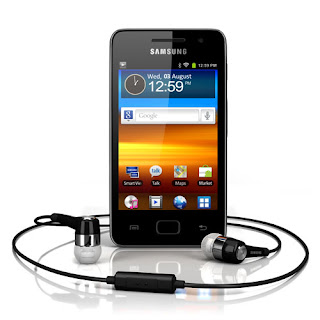
Samsung Galaxy S WiFi 3 6 User Manual Guide
 |
| Google Image |
[Download Samsung Galaxy S WiFi 3.6 User Manual Guide]
Friday, March 14, 2014
Samsung Galaxy Grand User Guide Manual Pdf
 |
| Google Images |
Saturday, February 1, 2014
Samsung Galaxy Ace 2 Black User Manual

PLS TFT capacitive touchscreen, 16M colors480 x 800 pixels, 3.8 inches (~246 ppi pixel density)Wi-Fi 802.11 b/g/n, DLNA, Wi-Fi Direct, Wi-Fi hotspot5 MP, 2592x1944 pixels, autofocus, LED flash, check qualityGeo-tagging, face and smile detectionYes, 720p@30fps, check qualityAccelerometer, proximity, compassSMS(threaded view), MMS, EmailYes, with A-GPS support and GLONASSGoogle Search, Maps, Gmail, YouTube, Calendar, Google Talk, Picasa integrationStandard battery, Li-Ion 1500 mAhUp to 670 h (2G) / Up to 640 h (3G)Up to 16 h 20 min (2G) / Up to 7 h 30 min (3G)